Floating Apps (multitasking)4.29.0
Publisher Description


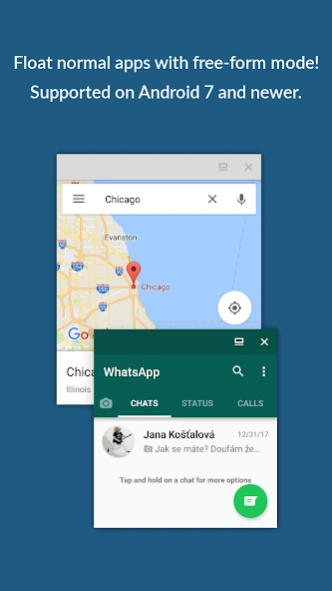

Experience real multitasking on your Android!
Experience real multitasking on your Android!Open more apps at the same time in floating windows and enjoy real multitasking! Don't leave current app for a small task... Floating Apps is the largest and the most advanced collection of floating mini apps available on Google Play!
- take notes or use calculator anywhere & anytime
- view email attachments without leaving email app
- view multiple PDF files at the same time
- open links in floating browser and view them later
- translate vocabularies without leaving current app
- and do much much much more...
Supported languages:
EN, IN, CS, DA, DE, ES, FR, IT, LT, PL, PT-BR, PT-PT, RO, SK, SV, VI, TR, RU, UK, KO, JA, HI, TH, ZH-TW, TH-CN, FA, AR, HU
If you have any problem with the app, contact us via
fa@lwi.cz
for help!
---
Floating Apps comes with more than 41 floating apps including:
- Browser
- Notes
- Document Viewer (PDF, DOC, DOCX, ODT and more)
- Calendar
- Calculator
- Contacts
- File Manager
- Music Player
- Video Player
- Image Viewer
- Audio Recorder
- Translator
- Paint
- Google Maps
- Wifi Manager
- Games
- and
21
more apps (see https://www.floatingapps.net for full list of
41
floating apps)...
- also, you can create your own floating apps from home screen widgets and URLs!
---
Our Commitment
Floating Apps is the best of its kind because of our commitment and never-ending work. We love to do it for you!
- We're always doing our best to help our users, so you're not left alone.
- We're developing Floating Apps for
more than 5 years
and it keeps getting better and better.
- We're listening to your requests and designing apps and features for you.
The Most Advanced Features
- Stop switching from one app to another and experience real multitasking with floating mini apps that make your life easier!
- Do not find the right floating app for you? Turn homescreen widgets and URLs into your very own floating apps.
- Access floating apps anywhere and anytime without leaving what you are just doing with Floating Menu and Quick Launch.
- Extremely powerful floating menu allows you to access not only floating apps, but also normal and recent apps and shortcuts!
- Access floating apps with one tap via movable & resizable quick launch icon that stays always on top of other apps.
- Move windows by simply dragging their title, resize them by dragging their bottom bar. Arrange windows your way!
- Maximize the floating app to utilize the whole screen. Minimize it if you don't need it now and restore it later.
- Easily access advanced features & functions, control the window, its borders and transparency with context menu!
- Open links, videos or images using floating apps the same way as you do with normal apps. Use shortcuts, notifications and more.
- It's just like multiviews / multi windows on Samsung or split screen mode but for all Androids!
Links
Web: https://www.floatingapps.net
Facebook: https://www.facebook.com/FloatingApps
Twitter: https://twitter.com/FloatingAppsNet
Google+: https://plus.google.com/+FloatingappsNet
Feedback: https://floatingapps.uservoice.com
Testers Community: https://plus.google.com/communities/111601071691478533219
Permissions
Please see complete list at http://www.floatingapps.net/permissions.
About Floating Apps (multitasking)
The company that develops Floating Apps (multitasking) is LWi s.r.o.. The latest version released by its developer is 4.29.0. This app was rated by 1 users of our site and has an average rating of 4.0.
To install Floating Apps (multitasking) on your Android device, just click the green Continue To App button above to start the installation process. The app is listed on our website since 2026-10-07 and was downloaded 42 times. We have already checked if the download link is safe, however for your own protection we recommend that you scan the downloaded app with your antivirus. Your antivirus may detect the Floating Apps (multitasking) as malware as malware if the download link to com.lwi.android.flapps is broken.
How to install Floating Apps (multitasking) on your Android device:
- Click on the Continue To App button on our website. This will redirect you to Google Play.
- Once the Floating Apps (multitasking) is shown in the Google Play listing of your Android device, you can start its download and installation. Tap on the Install button located below the search bar and to the right of the app icon.
- A pop-up window with the permissions required by Floating Apps (multitasking) will be shown. Click on Accept to continue the process.
- Floating Apps (multitasking) will be downloaded onto your device, displaying a progress. Once the download completes, the installation will start and you'll get a notification after the installation is finished.
Program Details
System requirements
Download information
Pricing
Version History
version 4.29.0
posted on 2026-10-07
4.29.0
FREE-FORM MODE: Normal apps open in a window more reliably on modern Android.
Better speed and stability, and many fixes.
4.28.0
Two small things that make the day easier.
BROWSER: Choose your search engine right on the welcome page.
PAINT: A bigger palette. Every colour family has a light, a full and a dark tone.
Plus many important fixes, more speed and better stability.
version 4.28.0
posted on 2026-09-18
Two small things that make the day easier.
BROWSER: Choose your search engine right on the welcome page.
PAINT: A bigger palette. Every colour family has a light, a full and a dark tone.
Plus many important fixes, more speed and better stability.
version 4.27.0
posted on 2026-09-10
I used to be a mobile game developer, so I am happy to bring new games to Floating Apps. Do not worry, more productivity apps are coming soon!
NEW: Blockiro - blocks fall, you turn and move them, and a full row goes away.
NEW: Brick Breaker - a paddle, a ball and a wall of bricks, levels that grow. Addictive!
NEW: Bouncing Balls - aim, bounce off the wall and drop three of one colour.
Plus many important fixes, more speed and better stability.
version 4.26.0
posted on 2026-09-03
Storage: You choose one folder for your data. Notes, lists and bookmarks now survive reinstalling the app and work on every Android.
Permissions: Most apps no longer ask for photos, videos and music.
Transparent windows take a touch again.
Floating menu: up to six columns.
Text editor: line numbers can be hidden.
Music Player: a "Do not repeat" choice.
Notes: more stable and faster.
The notification shows again on Android 16, and many crashes and freezes are fixed.
version 4.25.1
posted on 2026-08-23
18 new floating apps!
• Six games: Sudoku, Minesweeper, Solitaire, Snake, Reversi, Memory
• Text snippets, Developer tools, QR code, Emoji & symbols
• Blue light filter, Volume, Time tracker, Measure, Stocks, Pomodoro, Password generator, Pick one
Better: unit converter in Calculator, note search and sharing, new media engine in Video and Music Player, find & replace in Text editor, world clock, Browser session restore, 16 KB page support and many fixes.
version 4.23.2
posted on 2025-08-18
4.23.2
- Support for Android 16+
- Browser improvements
- Fixes UI glitches
- Minor fixes and improvements
version 4.23.1
posted on 2024-08-30
4.23.1
- Fixes problem with image viewer
4.23
- Support for Android 14
- Minor fixes and improvements
version 4.22
posted on 2023-05-09
- Support for Android 12 and 13
- New casual games from Gamezop
- Critical bug fixes across the app
- Minor improvements of many of included apps
- Many bug fixes and improvements
version 4.14
posted on 2021-03-31
- Adds support for Android 11
- Improves browser
- Improves floating menu
- Fixes many bugs
version 4.13
posted on 2020-05-15
- Number of ads decreased.
- YouTube made compatible with YouTube's Terms & Conditions.
- New translation platform and new translations.
- Many minor improvements and fixes.
